
The File Recording Output Destination in mimoLive includes an intelligent monitoring system that continuously estimates available disk space and predicts how long you can continue recording safely. This feature helps prevent interrupted recordings due to full disks.
How It Works
When a File Recording Output Destination is not yet activated, mimoLive uses the selected encoding settings, video frame size, and frame rate to estimate the required disk space. This estimation allows you to verify in advance whether the available space is sufficient for your intended recording length.
Once the recording is active, mimoLive begins to monitor disk space usage over time. It continuously measures how much space is being consumed by the recorded file and projects how long it can continue writing data before the disk is full.
The monitoring process runs at a regular interval of approximately 5 seconds, updating the available recording time estimate in near real time.
Warning Indicators
mimoLive provides visual indicators to alert you when the remaining disk capacity becomes critically low:
Yellow Warning: Appears when the system estimates that there are approximately 30 minutes of recording time left.

Red Warning: Appears when the system estimates that there are only 10 minutes of recording time left.
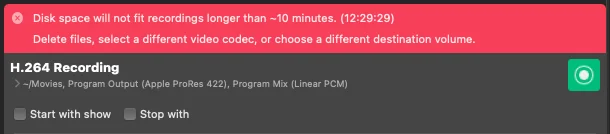
These alerts appear directly in the File Recording Output Destination panel, making it easy to monitor the recording safety status at a glance.