🎁  Get 6 months of mimoLive for your Mac free with the purchase of selected BirdDog camera bundles. More Info…

🎁  Get 6 months of mimoLive for your Mac free with the purchase of selected BirdDog camera bundles. More Info…

Meet your future.NDI-in-a-Box.

Dip your toes into AV over IP (AVoIP) without having to rip your studio apart or breaking the bank.

Get Started with AV over IP now
AVoIP is the future of live video production. Mastering it with high level of confidence requires a lot of learning. That's why it's important to get started now!high
Get a Great Mobile Production System
As an added bonus, you also get a top-notch mobile production system that you can put to work and gain firsthand experience with AVoIP in a real production.
Best With mimoLive
NDI-in-a-Box is designed for use with mimoLive on a MacBook Air or Pro. However, if that doesn't work out for you, it can be used with other live production systems, so you'll preserve your investment.
Everything You Need For NDI
The NDI-in-a-Box is self-contained when it comes to NDI. One neat box contains all the components needed to run a local NDI network and connect to the internet for streaming on platforms such as YouTube. Just connect some cameras, and you're ready to go.

Proven Concept.

MimoLive Mobile PTZ set 003
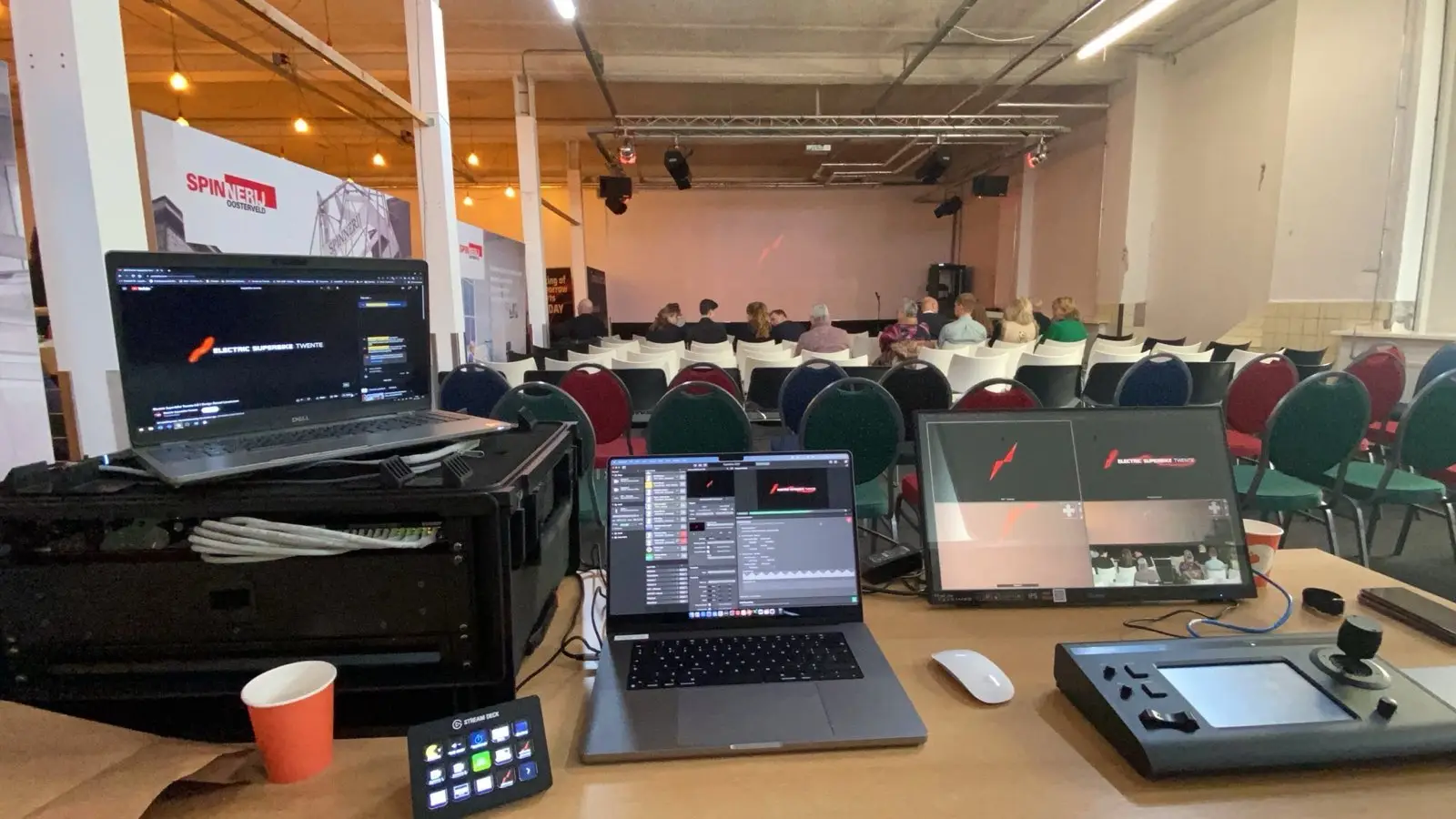
University of Twente
The University of Twente designed their own version of the NDI-in-a-Box, validating the concept.
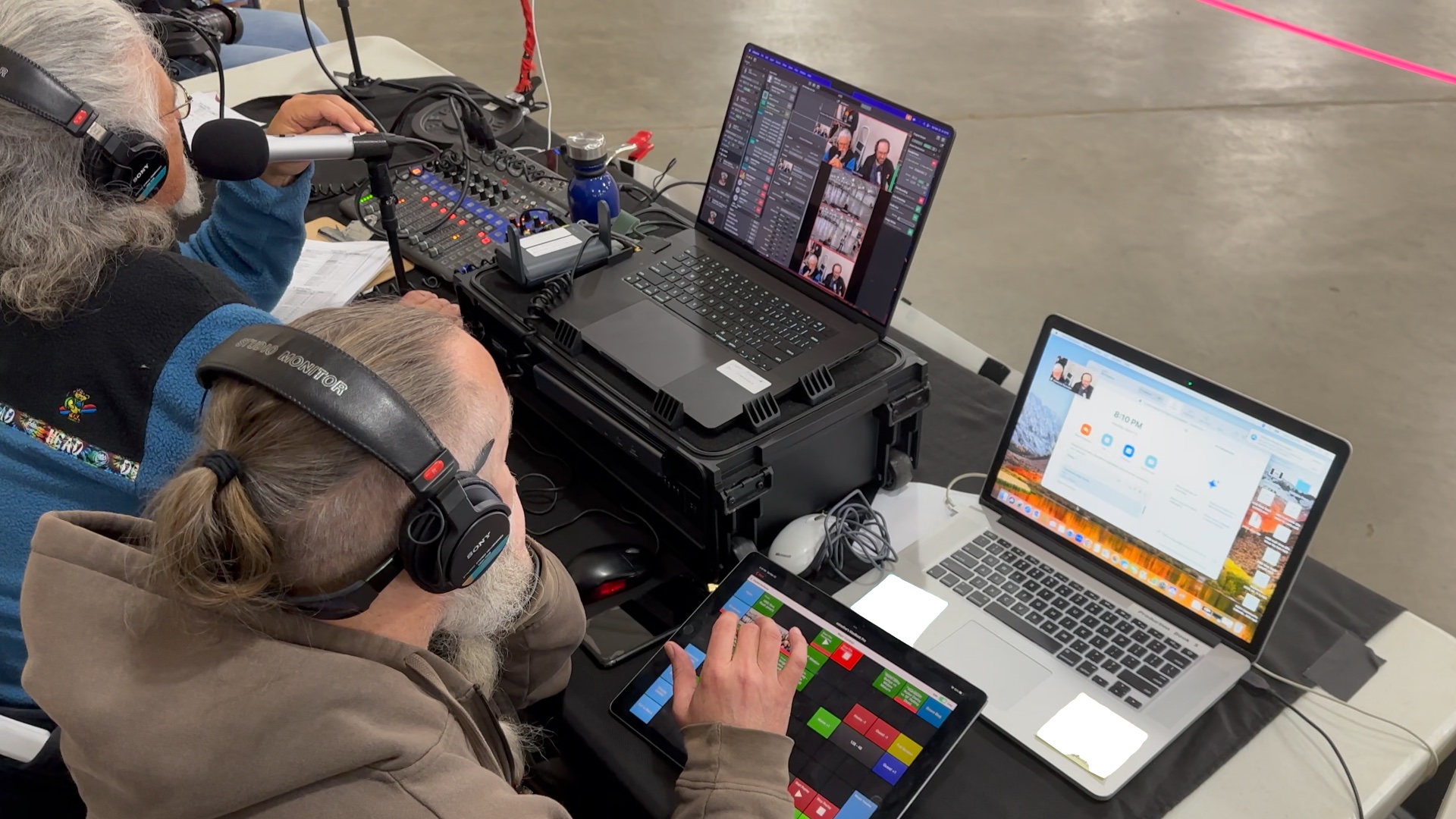
Humboldt Roller Derby
Access Humboldt
Access Humboldt purchased an NDI-in-a-Box pre-assembled and ready to use at the Roller Derby.

The NDIAdvantage.

If you’re looking to get your feet wet with AVoIP, NDI is the ideal technology. It’s lightweight, easy to work with, and doesn’t require any special networking equipment.
Fewer Devices
Because NDI runs on standard IP networks, every computer on the network can receive video from any source on the network, without requiring specialized hardware like an HDMI capture device or an SDI card. This reduces complexity, saving time and money and lowering the risk of failure.
Fewer Cables
Power, video, audio, control, and metadata all run over a single cable, which significantly reduces the number of cables you need. And because those cables can be quite thin, setting up a mobile production becomes faster and more convenient.
Software To The Bone
NDI doesn’t emulate hardware. Instead, it takes full advantage of what IP networking makes possible, for example, using the same cameras for multiple purposes from different computers, or running a single cable from the production booth to a switch on stage to aggregate multiple camera feeds.

The Perfect Numberof Components.

To keep things simple to build and costs in check, the NDI-in-a-Box system only uses what is necessary, yet has everything you need.

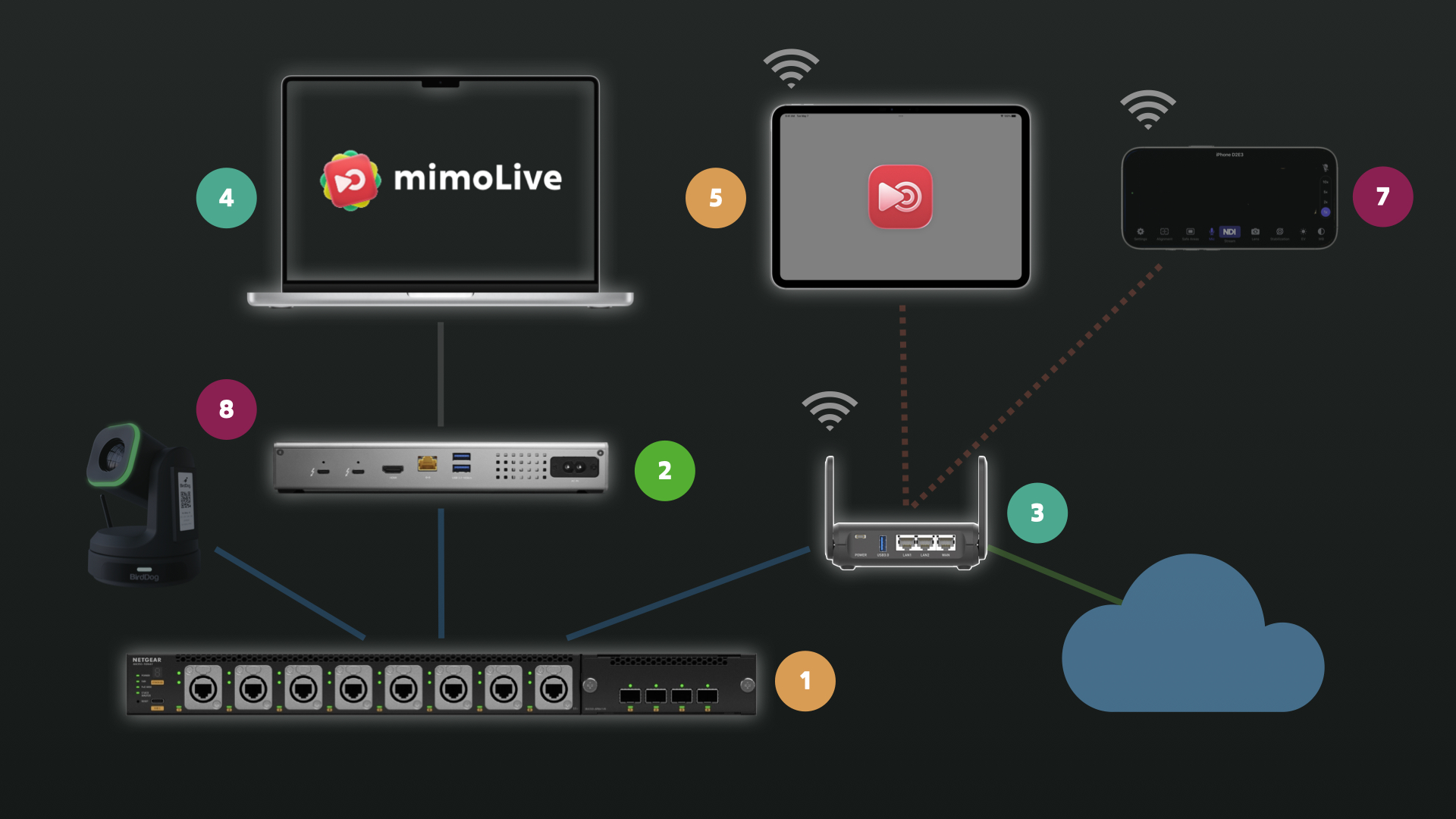
NDI in a box callout
1 - Netgear MSM4320
Optimized for NDI and with the Neutrik connectors that you can replace when they wear out, this Netgear switch is the ideal network backbone for the NDI on the box.
2 - OWC Go Dock
The Go Dock charges your laptop, provides a 2.5Gbps network port to connect to the Netgear, an HDMI output to connect to a projector or large display, additional USB-C and USB ports and an Audio-Jack for connecting a headset for Audio-Monitoring.
3 - GL.iNet Slate 7 Pro
This networking wunderkind creates a local Wi-Fi network for connecting the remote control surface on an iPad and connects you to the venues Wi-Fi, either hardwired or wireless. It also provides the necessary network services for the cameras and NDI.
4 - MacBook
Powerful hardware to run mimoLive on and make your production shine. Select the MacBook Air or MacBook Pro that best fits your budget, keeping in mind that this also defines the system's capabilities.
5 - iPad (optional)
Although it is optional, using a remote control surface on an iPad makes running your show much easier. Even untrained volunteers can effortlessly pick it up.
6 - mimoLive
Tie it all together with the best-in-class live production powerhouse. Everything you need, plus the stuff you’ll be glad you have.

Connect Cameras.Local And Globally.

Choose the cameras that best suit your various needs and connect them all to the NDI-in-a-Box, even if they use different formats and frame rates.

NDI Cameras
The NDI ecosystem now offers a wide variety of cameras with native NDI support. The most useful are the PTZ cameras, which allow you to adjust camera angles using the built-in PTZ controls in mimoLive without having to walk to the camera. (Take advantage of the BirdDog promo if you're looking for new cameras...)
HDMI and SDI Cameras
If you have invested heavily in cameras or need a camera type that isn't available with native NDI support, there are several options for converting HDMI, SDI, and USB cameras to NDI.
Mobile Phone
"The best camera is the one you have with you" is a popular saying among photographers. Nowadays, mobile phones have incredible cameras, and you can easily use them with the NDI-in-a-box. You can either run the NDI HX Camera app or use Zoom as a backhaul.
NDI Bridge
Use the free NDI Bridge app with the NDI Tools to access NDI cameras in remote locations or send your video to your studio via NDI. As the name suggests, the app provides a bridge between your local and remote NDI networks, allowing each to see the NDI devices in the other.
Zoom
mimoLive integrates directly with the Zoom SDK, giving you access to high-quality audio and video feeds from each participant. With this feature, you can run hybrid productions and meetings or take audience participation to a new level with your NDI-in-a-box.

Connect Audio.Analog And Digital.

NDI
You can use PoE audio-to-NDI devices to ingest venue audio from the mixing board into mimoLive via the network.
USB Audio Interface
Connect any USB audio interface to your NDI-in-a-box to receive analog audio from any source.
3.5 mm Analog
MacBooks still have a 3.5mm analog audio input jack. While not the best quality, it's a good backup option.

Buy Pre-assembled or DIY.

Buy Pre-Assembled
If you’re interested in purchasing the NDI-in-a-box pre-assembled including a multi-year mimoLive license and a 45 min one-on-one remote coaching session to get you started with mimoLive, contact mimoLive sales.
Do It Yourself
The NDI-in-a-box is easy to assemble: Just four components go into the box and need to be wired up properly.