
🎁 Get 6 months of mimoLive for your Mac free with the purchase of selected BirdDog camera bundles. More Info…

🎁 Get 6 months of mimoLive for your Mac free with the purchase of selected BirdDog camera bundles. More Info…

Give Your Students a Newsroom.Not Just a Camera.

A student-run news studio that fits in an ordinary classroom, with real roles, real deadlines, and the same broadcast technology the professionals use.

Ask a student to write an essay and you get an essay. Ask them to go live in front of the whole school at 8:15 tomorrow morning and something else happens: the writing gets tighter, the rehearsal happens without being assigned, and the deadline enforces itself.

That is what a classroom news studio really is. Not an AV project but a newsroom, with a standing crew doing real jobs, a real audience, and a show that has to make air whether or not everything went to plan. Students learn to write for the ear, speak to a camera, hold a technical role under pressure, and hand off cleanly to the person beside them.

The technology is deliberately unremarkable once it is set up. A desk in the classroom becomes the news desk. A blank wall becomes the weather corner. The school network carries the video. What is left is the part that actually teaches: the show itself.
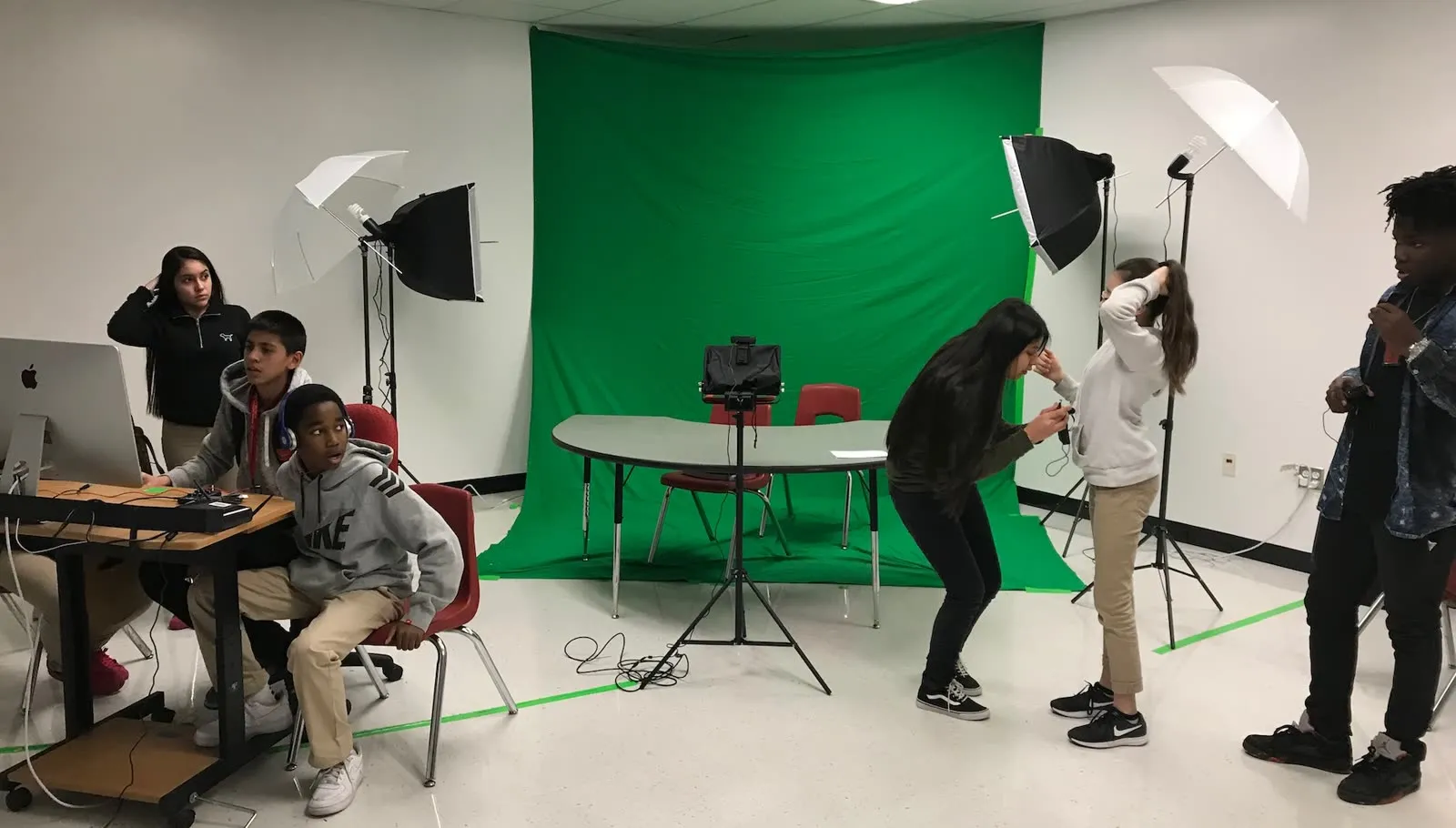
Students at a classroom news studio: one crew at the control desk with a Mac and audio mixer, others setting up the shot in front of a green screen

Roles to rotate

  • Anchors at the news desk
  • Weather presenter
  • Director, switching the show
  • Graphics and lower thirds
  • Sound effects and music
  • Producer, running the rundown
Several students run the show at once
A real deadline every morning
Simple enough for students to operate
The same technology broadcasters use
Skills that outlast the school year

What a news show teaches

The gear list is the least interesting part of this setup. Here is what actually happens when a class has to make air every morning.

Everyone has a job
Because the Remote Control Surface runs on an iPad, more than one student can operate mimoLive at the same time. One switches cameras, another drives graphics, another plays the sound effects, while the anchors and the weather presenter work in front of the lens. Rotate the roles weekly and by the end of the term everyone has done everything.
The audience is real
Announcements read over a PA get tuned out. The same announcements delivered by classmates on screen get watched by students, by teachers, and often by parents at home. That audience is what turns a writing exercise into something students care about getting right.
The skills transfer
Multi-camera switching, live graphics, audio mixing, streaming and video over IP are not classroom simulations. They are the tools of the trade, and a student who has run a live show for a year leaves with a portfolio and a vocabulary that colleges and employers recognize.
It stops being your show
The first few episodes need you at the desk. After that the crew knows the rundown better than you do, and your job shifts from operator to editor, asking whether the story is any good rather than which button comes next.

The layout

Two areas in one room, plus a control position. That is the whole footprint.
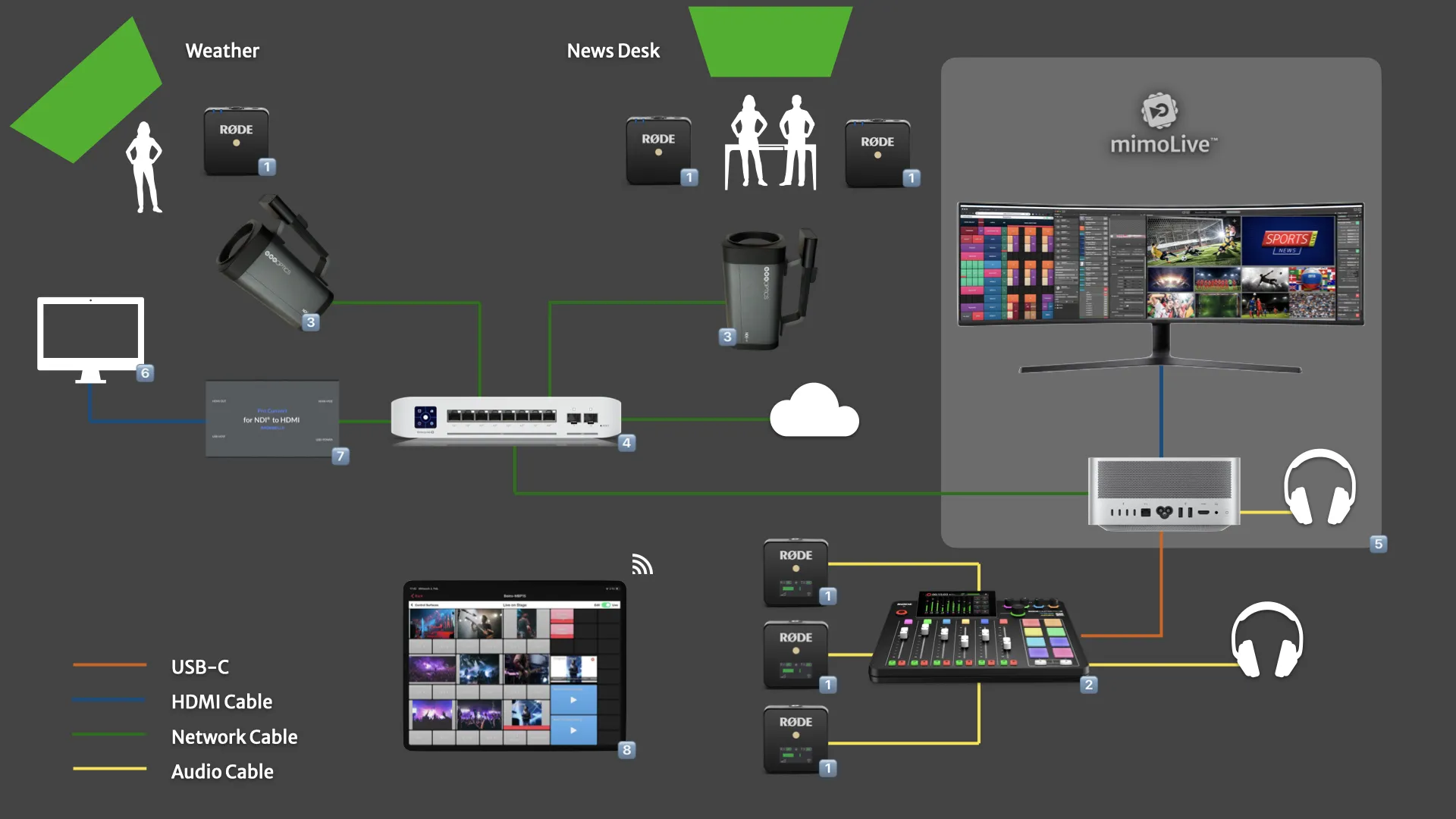
Classroom News Studio layout: news desk, weather corner, NDI cameras, Rodecaster audio mixer and a Mac running mimoLive
News desk
A classroom desk, two anchors on wireless microphones, one camera on a tripod. Add a green screen behind them and a close-up camera later if you want over-the-shoulder graphics. The show works without either.
Weather corner
A blank wall or a colored curtain, one presenter on a wireless microphone, and a camera set as wide as it will go so they can walk across the map. A confidence monitor shows them where they are pointing. mimoLive's machine-learning Background Removal means you do not need a green screen at all.
Control position
A Mac running mimoLive, a wide display for the multiview, and iPads for the crew. Everything the students touch during the show lives here.

How it works

Outlined here, wired up step by step in the manual.

Video over the network
Cameras send video as NDI over ordinary Ethernet, so there are no capture cards and very few cables. Native NDI cameras plug straight in; HDMI cameras you already own join through a converter.
Audio on XLR
Wireless microphones feed a Rødecaster Pro II, which sends one clean mix to the Mac. Audio stays on traditional cabling because networked audio adds complexity a classroom does not need.
One Mac in the middle
A Mac Studio runs mimoLive and mixes everything into a 1080p program feed for streaming, recording, or playout into the school's own distribution system.
iPads for the crew
Remote Control Surfaces put a purpose-built control panel in each student's hands over Wi-Fi, showing only the buttons their role needs.
Lighting
Classroom lighting is usually bright and diffuse enough for a news show. Dedicated lights make it look better, but they are not what stands between you and going live.
Playout to the school
mimoLive produces output for whatever your school already uses to distribute video, whether that is a broadcast network, the computer network, or a public stream. Worth a conversation with your IT department early, and possibly a playout device in the budget.

The full parts list, wiring diagram and step-by-step build instructions live in the Classroom News Studio guide in the mimoLive User Manual. Want help scoping it for your room? Book a one-on-one consultation, or join the discussion on the Boinx Forum.

Ready to get started?

Download. Get License. Learn. Connect. You’re just four steps away from creating your best show ever.
mimoLive
Download
Grab the latest version for macOS and dive right in.
Enter License Icon
Get a Free License
Request your Evaluation Edition license and unlock all features.
Watch tutorial
Watch the Getting Started Tutorial
Follow our quickstart video to launch your first production.
Join mimoLive Experts on Discord
Join the mimoLive Experts Community
Connect with peers, ask questions, and improve your workflow on Discord.