How to create a stunning weather show using Chroma Key technology
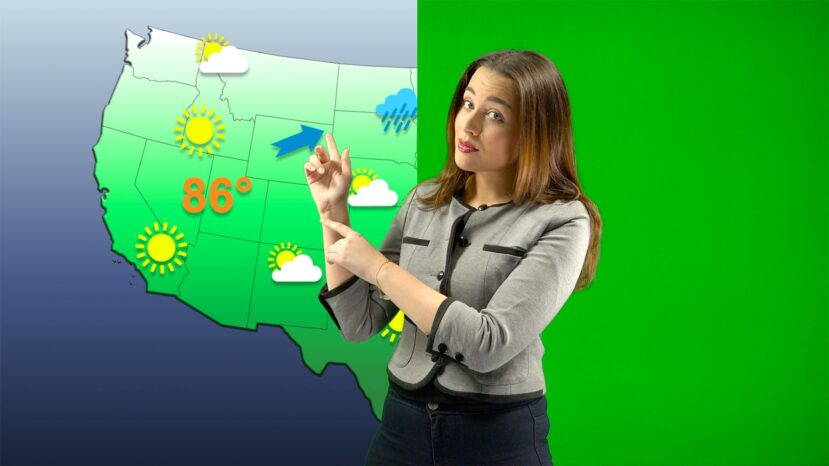
The chroma key feature will allow telling the weather forecast visually attractive to the audience. Whatever the weather is, there is always a story to tell to your audience.


The chroma key feature will allow telling the weather forecast visually attractive to the audience. Whatever the weather is, there is always a story to tell to your audience.

There is a lot more that goes in making a video content sound professional and also be interesting for the fans. We have put together some tips that are useful to create video news or content like a professional TV news anchor or reporter.
Monitoring and answering comments is the holy grail of growing and engaging your audience. Meterologist John Marshall uses the updated Facebook Comments feature of mimoLive




You are currently viewing a placeholder content from Vimeo. To access the actual content, click the button below. Please note that doing so will share data with third-party providers.
More InformationYou are currently viewing a placeholder content from YouTube. To access the actual content, click the button below. Please note that doing so will share data with third-party providers.
More InformationYou need to load content from reCAPTCHA to submit the form. Please note that doing so will share data with third-party providers.
More InformationYou are currently viewing a placeholder content from Facebook. To access the actual content, click the button below. Please note that doing so will share data with third-party providers.
More InformationYou are currently viewing a placeholder content from Google Maps. To access the actual content, click the button below. Please note that doing so will share data with third-party providers.
More InformationYou are currently viewing a placeholder content from Vimeo. To access the actual content, click the button below. Please note that doing so will share data with third-party providers.
More InformationYou are currently viewing a placeholder content from YouTube. To access the actual content, click the button below. Please note that doing so will share data with third-party providers.
More InformationYou are currently viewing a placeholder content from Instagram. To access the actual content, click the button below. Please note that doing so will share data with third-party providers.
More InformationYou are currently viewing a placeholder content from reCAPTCHA. To access the actual content, click the button below. Please note that doing so will share data with third-party providers.
More Information