
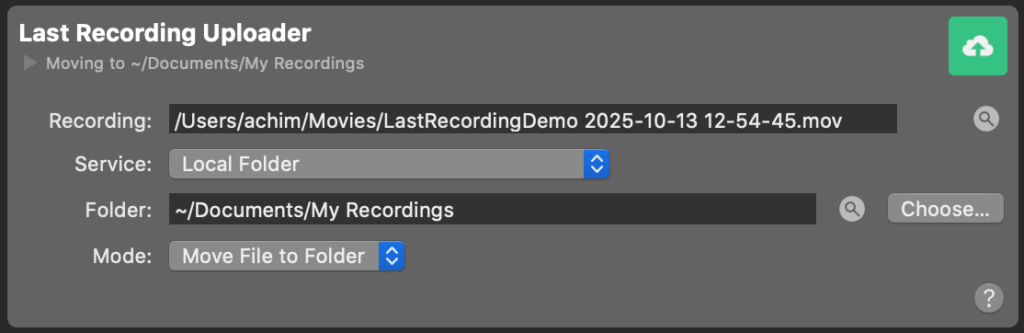
The Last Recording Uploader automatically transfers the most recently finished recording created by a File Recording Output Destination to a specified location — either a local folder or a remote server via SSH.
This feature is useful for automating post-production workflows, backups, or external file delivery.
Please note there is also a Last Recording Video Source that is independ from this Last Recording Output Destination.
Fields
Recording
Displays the full file path of the most recent recording. A circle shows the upload progress while the file gets uploaded to its destination. The magnifier button next to the field reveals the file in Finder, allowing quick access.
Service
Defines where the file will be uploaded or moved to.
Available options are:
- rsync via SSH – Uploads the recording to a remote server using SSH and rsync.
- Local Folder – Moves or copies the recording to a folder on your local Mac.
Uploading a recording to a remote server via SSH using rsync
When “rsanc via ssh” is selected the following fields appear:
- Server – The address of the remote server (for example,
example.comor192.168.1.10). - User Name – The user account used for the SSH connection.
- Folder Path – The target directory on the remote server where the recording should be uploaded.
Storing a recording on the local system
When “Local Folder” is selected the following options are available:
- Folder – Displays the destination folder path.
- The magnifier button opens the folder in Finder.
- The Choose… button allows selecting a different folder.
- Mode – Determines how the recording file is handled:
- Move File to Folder – Moves the recording file to the target folder (removing it from its original location).
- Make a Copy – Copies the recording file to the target folder while keeping the original file.