
Configure NDI® send and receive settings that apply to every mimoLive document.
Opening the NDI® Settings Window
All of the following actions will open the NDI® Settings window:
- Select NDI® Settings… from the Window menu.
- Select NDI® Receive Settings… from the device popup menus in Audio Sources or
Video Sources. - Click the action button to the right of the Failsafe Source menu in the NDI® Output Destination.
Receive Settings
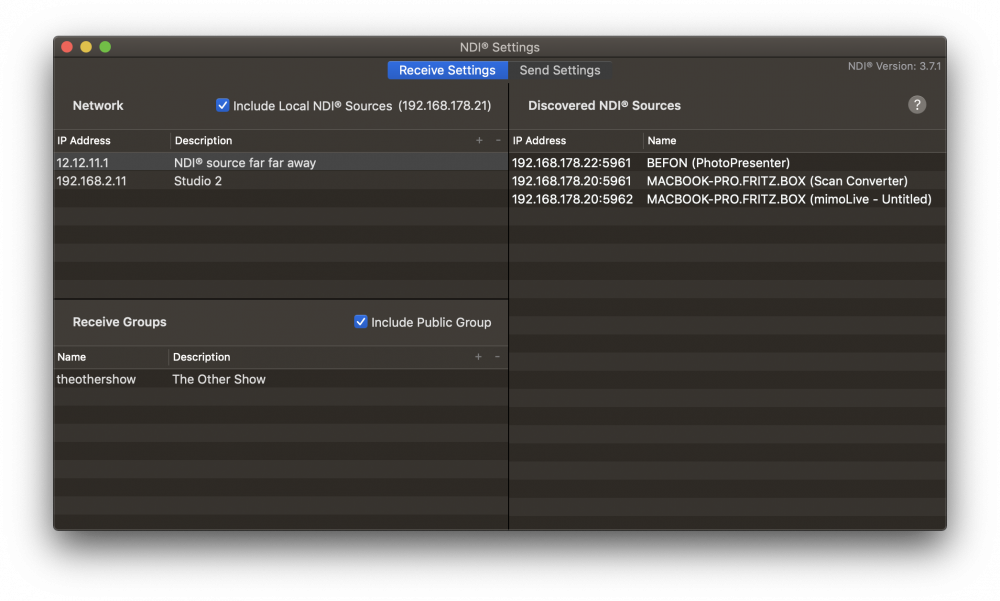
Network
Add IP addresses that you want to be searched for NDI® senders. This can be IP addresses from other local subnets as well as from remote locations. While you must add a valid IP address, the description is completely optional but should help you add some context.
Click the + button in the upper-right table header to add an IP address or click the – button right next to it to remove one or several selected IP address(es) from the list.
Check Include Local NDI Sources to allow searching your local host for NDI® senders, i.e. other NDI® enabled software running on the same machine. Your local IP address will be displayed in parenthesis as additional information.
Receive Groups
Add the names of groups that you want mimoLive to search for NDI® senders. Other instances of mimoLive, or any other NDI® enabled software or hardware, can specify these groups as their send groups. Adding a description is optional.
Click the + button in the upper-right table header to add a group name or click the – button right next to it to remove one or several selected group names from the list.
Check Include Public Group to allow searching the default group for NDI® senders. Unchecking this option may be helpful in networks crowded with NDI® senders where you are interested only in senders from specific send groups.
Discovered NDI® Senders
This table lists all NDI® senders that the NDI® discovery service was able to find with the given settings, i.e. looking up the specified IP addresses, searching the specified receive groups and including or excluding local senders according to your selection. It is the same list of NDI® senders that is available from the devices menu in Audio](doc:audio) and [Video Sources and from the
Failsafe Source in the NDI® Output Destination.
Send Settings
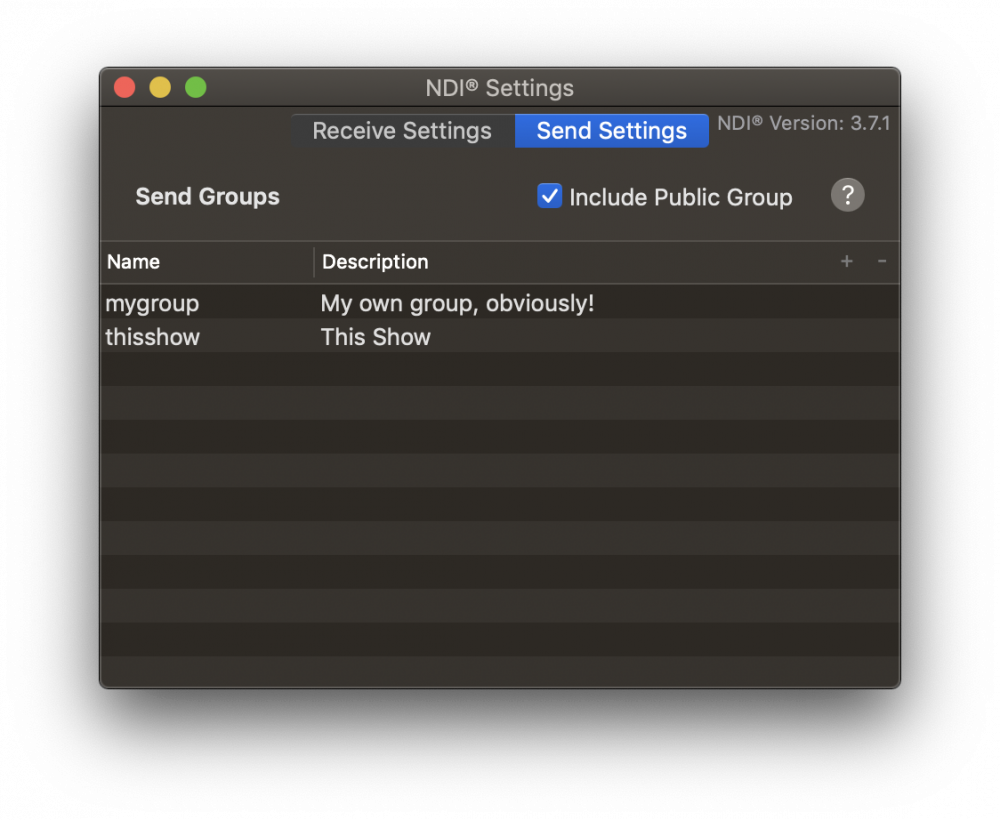
Send Groups
Add the names of groups that you want NDI® Output Destinations to appear in. Other mimoLive instances or any other NDI® enabled software or hardware, can discover the mimoLive NDI® output by adding the same group name to its receive groups list. Adding a description is optional.
Click the + button in the upper-right table header to add a group name or click the – button right next to it to remove one or several selected group names from the list.
Check Include Public Group to publish NDI® Output Destinations in the default group. Unchecking this option may be helpful in networks crowded with NDI® senders where you want to isolate NDI® Output Destinations in specific send groups.
NDI® Version
Starting with mimoLive 4.5 the currently used NDI® SDK version number is displayed in the top right corner of the NDI® Settings window. The version number does not correlate with the version of the NDI® HX driver if one is installed on the system.